B2B sales for print and custom products
WooCommerce quotes.
From request to order.
Collect product choices, quantities and artwork in one request. Review the specification, send a PDF offer and create a linked WooCommerce order when the customer accepts.
ConfigCraft Quote requires the Free core, WooCommerce and a matching ConfigCraft Pro licence.
One connected sales workflow.
1. Collect the request
Keep selections, quantities, customer details and uploaded files together for the sales team.
2. Review and send the offer
Check pricing and feasibility, then send the quoted amount, validity and PDF from the workspace.
3. Create the order
After acceptance, record approval and convert the quote. The configuration and files stay linked to the order.
A print shop example
500 custom boxes. A few details to confirm.
A buyer chooses the format, material, print coverage and quantity, then uploads the artwork. Your team still needs to check finishing, delivery or a special production requirement before confirming the price.
01 · Customer request
Start with a complete specification.
The customer submits the configured product with contact details and any collected files. Quote keeps a snapshot of the request, including the estimated total when costs are shown, so the team can review what was actually submitted.
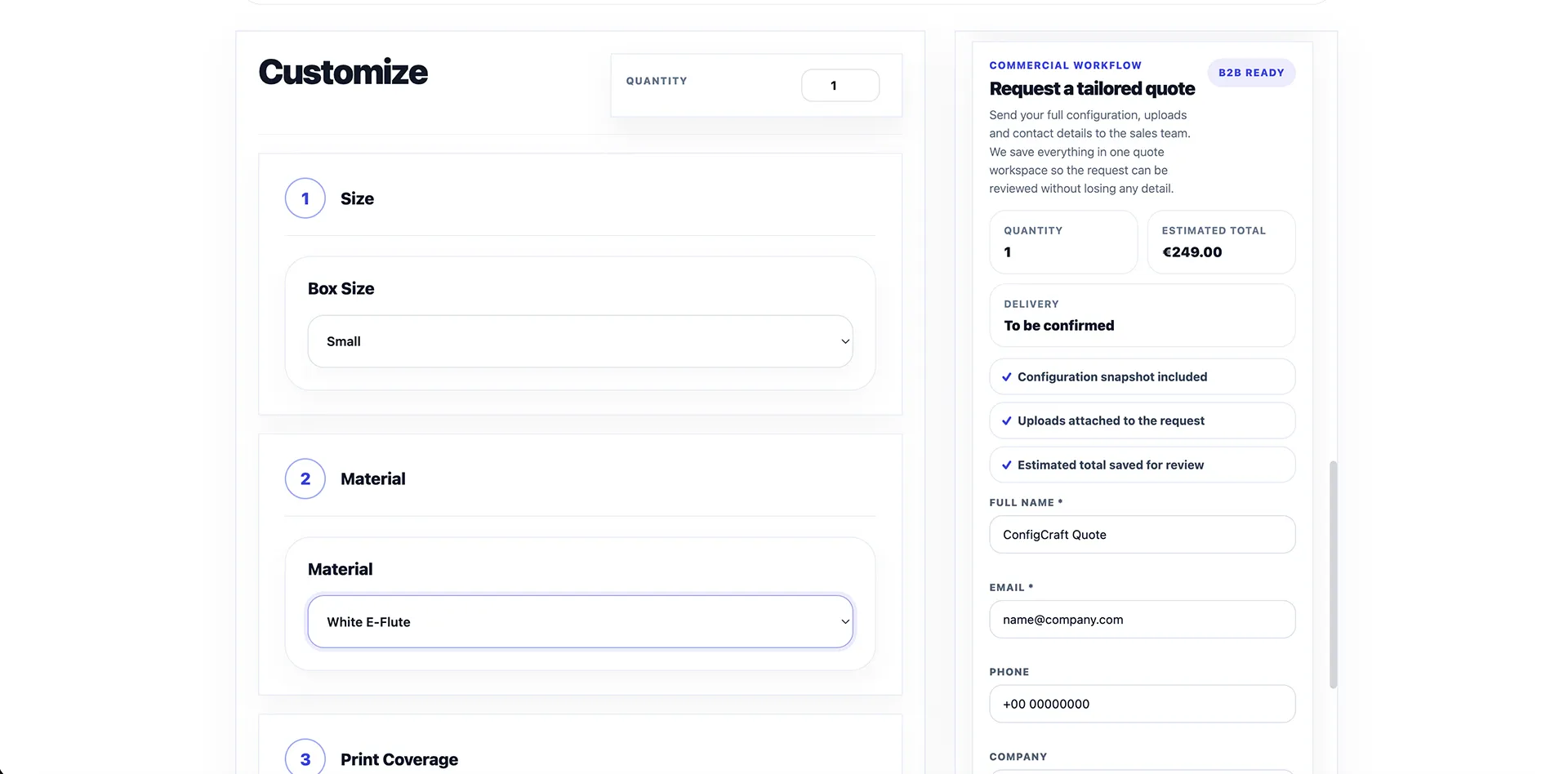
Real storefront interface: configuration and quote request side by side. Select the image to inspect it.
02 · Commercial review
Review the details. Send a clear offer.
Check the selected options, quantities and available artwork. Set the quoted amount, customer message and validity date, then send the offer by email with its PDF attachment. Internal notes help your team keep commercial context in the workspace.
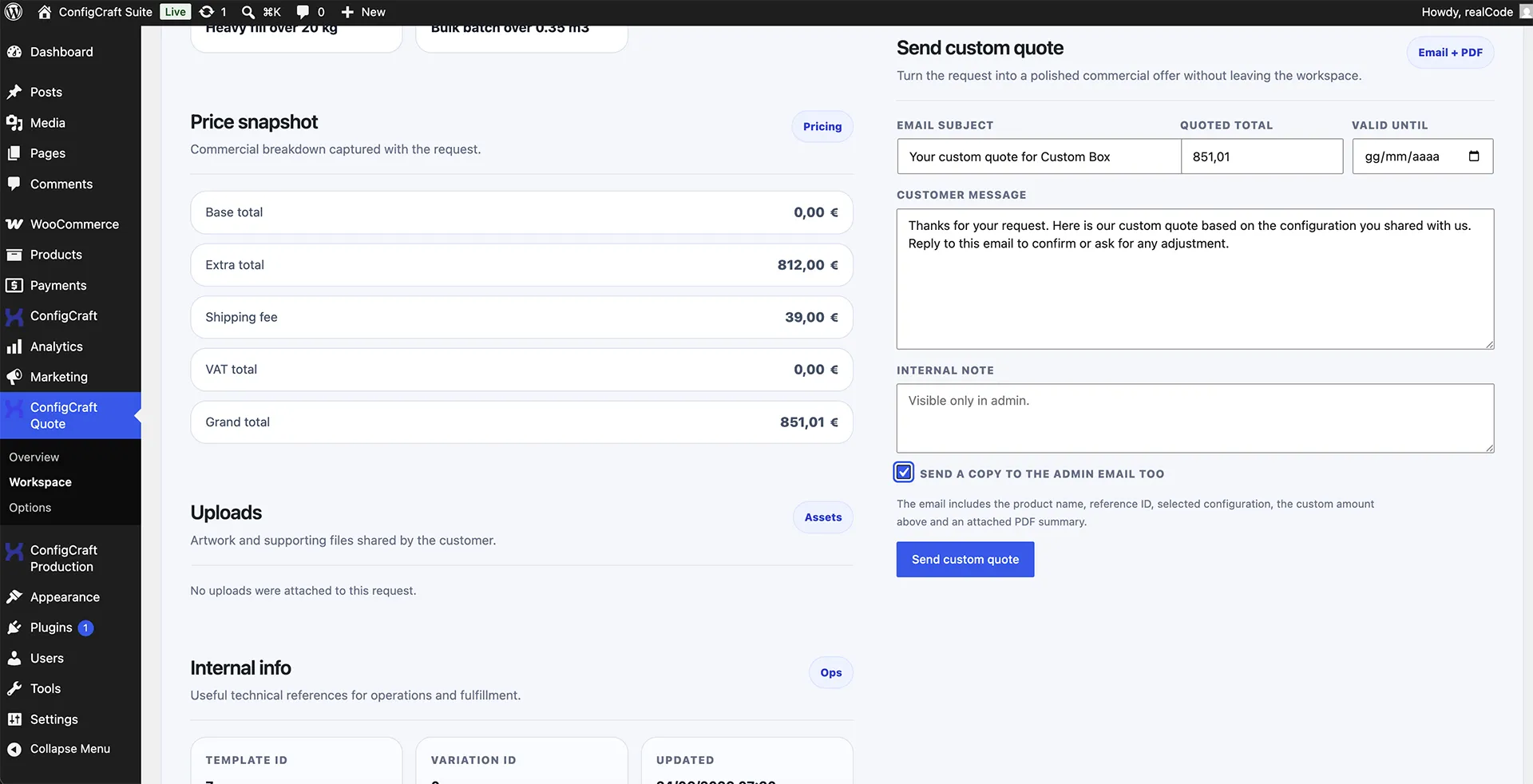
Real Quote workspace: the price snapshot and the email/PDF offer controls. This demo request has no attached files.
03 · Order conversion
Turn acceptance into a connected order.
When the customer accepts the offer, your team records approval and converts the request from the Quote workspace. The resulting WooCommerce order retains the configuration payload, upload references and a link to the original quote.

Real conversion result: the request is marked Converted and the linked WooCommerce order can be opened.
Choose the modules for your process.
The quote workflow
Free provides guided configuration and file collection. Pro adds advanced pricing tools. Quote adds the sales workspace, PDF offers, emails and order conversion. Quote is a commercial add-on with a matching Pro licence requirement.
After the order
Add ConfigCraft Production when the operational team needs worksheets, statuses, internal notes and file handling. Production is a separate commercial module; it is optional for the quote-to-order workflow.
Before you add a quote workflow.
Can simple products still use direct checkout?
Yes. Keep direct checkout for products with confirmed specifications and pricing. Use the quote path for products that need commercial review.
Does an email acceptance automatically create an order?
No. Your team records the acceptance and starts the conversion from the workspace. Creating the order does not itself collect payment.
Do the configuration and uploaded files remain connected?
Yes. Conversion preserves the configuration data and upload references on the WooCommerce order, together with the link to the source quote. Review these details before processing the order.
Can I use Quote with the Free plugin alone?
No. Quote requires WooCommerce, the Free core and an active ConfigCraft Pro licence with the matching site tier. Free remains a complete standalone configurator for its core workflow.
Bring one product. Walk through the quote.
Tell us what you sell, how you price it and what your team needs to check. We will focus the guided demo on the steps from configuration to a reviewed offer and order.