Advanced WooCommerce pricing guide
WooCommerce Dynamic Pricing Configurator
A WooCommerce dynamic pricing configurator calculates the selling price from the customer’s actual configuration. It can combine option adjustments, quantities, dimensions, matrices, imported price lists, and conditional rules while keeping the total visible.
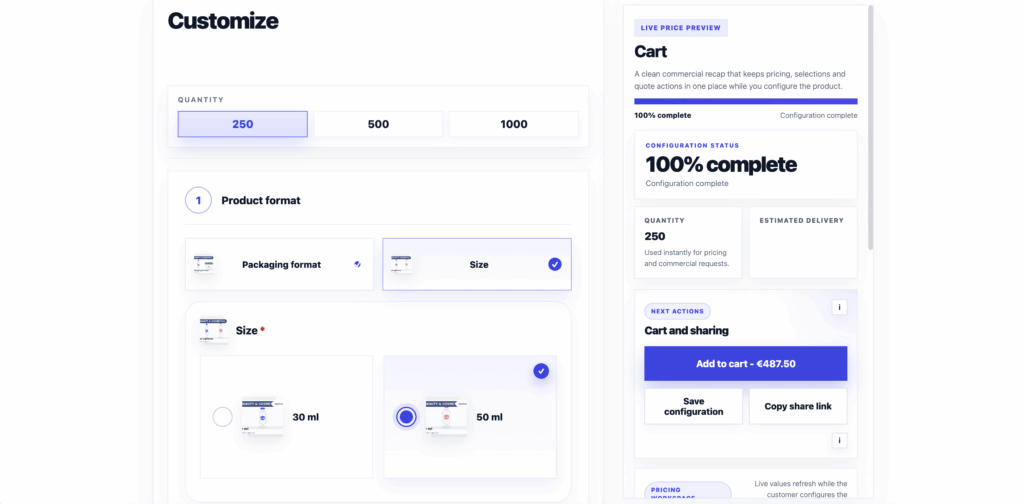
What dynamic pricing means for configurable products
Dynamic pricing is not simply a sale rule or a global discount. In a configurator, it means the price responds to the specification the buyer is building. The same base product can therefore support simple surcharges, quantity tables, dimensional calculations, or a commercial price list without creating hundreds of WooCommerce variations.
Four practical pricing methods
Option adjustments
Add or subtract a fixed amount when the buyer chooses a finish, accessory, service, or other straightforward extra.
Matrix pricing
Look up a price from connected dimensions such as format and quantity, material and size, or another controlled combination.
CSV price lists
Import structured commercial values when the source of truth already lives in a maintained spreadsheet or business price table.
Conditional pricing filters
Apply a price row only when the selected configuration matches the required fields, quantities, or product conditions.
Inside the ConfigCraft Pro pricing workflow
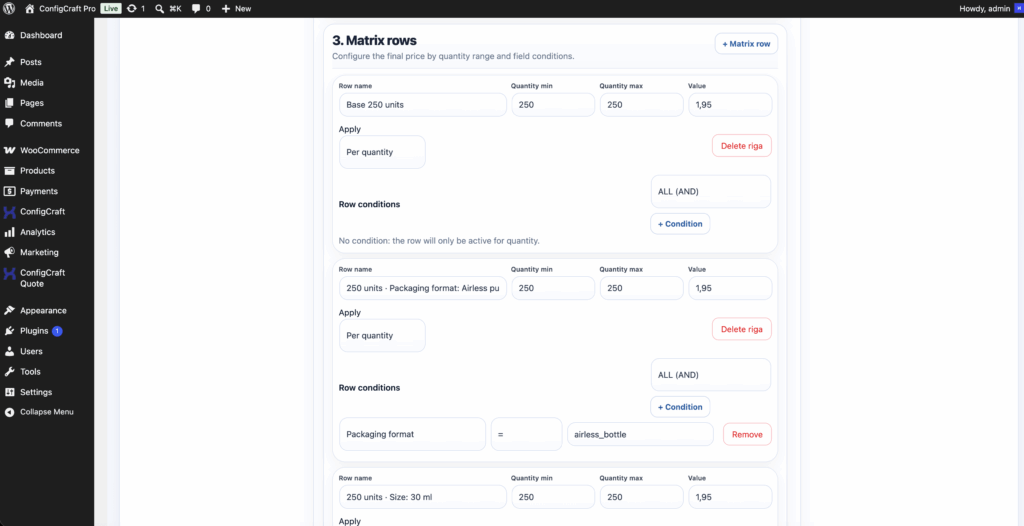
The matrix editor keeps pricing data separate from the customer-facing layout. This makes it easier to review how commercial values are selected, test representative combinations, and update a price source without redesigning the product flow.
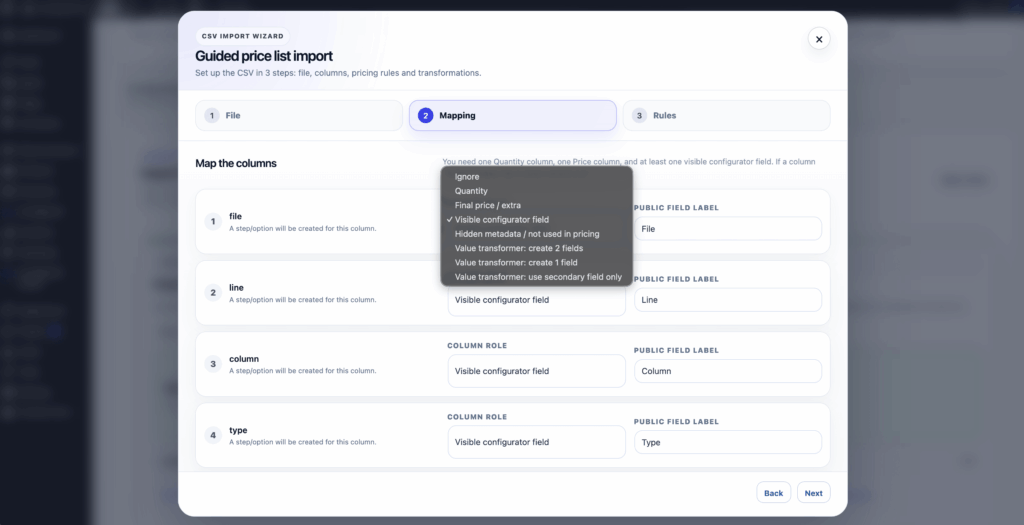
When prices already exist in a structured file, CSV import provides a repeatable path from the maintained source to the configurator. Validate columns, duplicate combinations, missing values, and edge quantities before publishing.
Worked example: quantity and format drive the total
This example uses the real ConfigCraft pricing and storefront screens. Imagine a print product where format and quantity select the base matrix row, material changes the eligible choices, and finishing adds a controlled adjustment. The configurator evaluates those selections and displays the current total before checkout or quote submission.
A safer implementation sequence
- Define the commercial source of truth and the combinations customers are allowed to buy.
- Choose the simplest pricing method that represents the real rule accurately.
- Build the guided option flow and connect each price input to the correct fields.
- Test minimum, maximum, missing, and boundary values in the pricing simulator.
- Verify the displayed total again in the cart, checkout, order, quote, and production record where applicable.
Common dynamic pricing mistakes
- Recreating a large price matrix as hundreds of manual WooCommerce variations.
- Allowing invalid option combinations to reach a price lookup.
- Importing a CSV without checking duplicate keys or missing rows.
- Showing a total without preserving the selected pricing inputs in the order.
- Testing only one typical configuration and ignoring boundary quantities.
Frequently asked questions
Can WooCommerce calculate a price from product dimensions?
Yes, when the dimensions are validated inputs connected to an appropriate formula, matrix, or price-list rule. Test the allowed ranges and rounding behaviour before launch.
When should I use matrix pricing?
Use a matrix when the commercial value is selected from controlled intersections such as format and quantity or material and size.
Can I import WooCommerce prices from CSV?
ConfigCraft Pro can import structured CSV price lists. Keep the file format consistent and validate incomplete or duplicated combinations before making the product public.
Does the dynamic price remain in the WooCommerce order?
The validated configured price and its product configuration should be carried into the WooCommerce cart and order so the commercial result can be reviewed later.
Is DestinX Product Configurator enough for dynamic pricing?
Free supports simple per-option adjustments. Matrix pricing, CSV imports, cross-field filters, and pricing simulation are ConfigCraft Pro capabilities.
Test your real pricing model
Use the live demo to inspect the customer flow, then compare the annual plans for the pricing, quote, and production capabilities your store needs.