WooCommerce Product Options vs Product Configurator
WooCommerce product options guide
Product options work well when buyers only need a few independent choices. A guided configurator becomes more useful when selections affect one another, change the price, require files, or must continue into quotes and production.
Product options and product configurators solve different problems
A standard product-options extension adds fields to a WooCommerce product page. Customers may select a colour, enter text, choose an accessory, or upload a file. This is often enough for products with a short list of independent extras.
A product configurator manages a connected decision process. It can divide choices into steps, show only valid options, calculate a changing total, preserve the configuration in the cart and order, and route the result into a quote or operational workflow.
| Requirement | Simple product options | Guided configurator |
|---|---|---|
| A few independent add-ons | Good fit | Supported |
| Multi-step buying journey | Usually limited | Designed for it |
| Conditional dependencies | Varies by plugin | Core workflow |
| Matrix or CSV pricing | Usually not included | Available in ConfigCraft Pro |
| Structured quote request | Separate workflow | ConfigCraft Quote |
| Production handoff | Manual or separate | ConfigCraft Production |
When simple WooCommerce product options are enough
- The product needs only a handful of fields or extras.
- Each choice adds a fixed amount and does not depend on another field.
- The buyer can understand every option on one screen.
- The completed selection can move directly to the normal WooCommerce checkout.
When a guided WooCommerce configurator is the better fit
- Later choices depend on material, size, quantity, or an earlier answer.
- The price comes from a matrix, dimensional rule, quantity break, or imported price list.
- Customers must upload artwork, specifications, or reference files.
- The team needs an exact configuration recap in the cart, order, quote, or production record.
- Some configurations can be purchased while others require commercial review.
Worked example: a configurable print product
This is a real ConfigCraft workflow example, not a fabricated customer case. A buyer selects a format, material, finish, and quantity. The flow can hide incompatible choices, update the commercial total, collect artwork, and preserve the final specification for the next team.
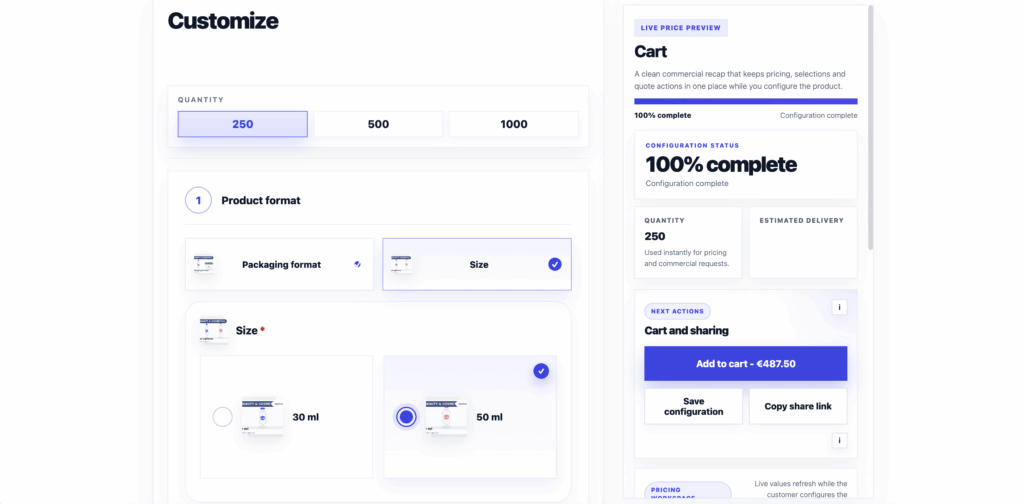
1. Guide the selection
Split a complex product into purposeful steps and keep the current configuration visible.
2. Calculate the total
Apply option adjustments or advanced pricing rules and show customers how the total changes.
3. Preserve the result
Carry the validated configuration into WooCommerce cart and order data, or into a reviewed quote.
How ConfigCraft fits into WooCommerce
DestinX Product Configurator provides the guided configurator core, simple option pricing, uploads, saved configurations, sharing, and WooCommerce recap. ConfigCraft Pro adds matrix pricing, CSV imports, cross-field filters, pricing simulation, starter kits, updates, and support. Quote and Production extend the same saved configuration instead of rebuilding the data in separate tools.
Frequently asked questions
What are WooCommerce product options?
They are additional choices or fields attached to a WooCommerce product, such as colours, dimensions, text, accessories, quantities, or file uploads.
What is the difference between product add-ons and a configurator?
Add-ons usually extend a product with independent fields. A configurator manages a guided sequence, dependencies, pricing logic, validation, and a structured configuration recap.
Can product options change the WooCommerce price?
Yes. DestinX Product Configurator supports simple option adjustments, while ConfigCraft Pro adds matrix pricing, CSV price lists, and advanced filters for connected selections.
Can customers upload artwork or technical files?
Yes. The configuration can collect permitted files and keep them associated with the configured product through the relevant WooCommerce workflow.
Which ConfigCraft edition should I choose?
Use Free for guided options and simple pricing. Choose Pro for advanced pricing and conditional filters, then add Quote or Production when the workflow continues beyond direct checkout.
See the difference in a live product flow
Open the ConfigCraft demo to test guided choices, live pricing, saved configurations, uploads, quote paths, and the WooCommerce handoff.